

Designing AI Tools for Legal Professionals
I led the design of four AI-powered features at BridgeLegal that reduced manual documentation overhead by 300+ hours per month while improving accuracy and client satisfaction.
The result? Attorneys spending less time searching for information and more time serving clients. Paralegals freed from repetitive document review to focus on complex case work. And a product that became BridgeLegal's key competitive differentiator.
100+ hrs
Hours saved
Accuracy
90%
~ 12 wks
Timeline
COMPANY NAME
BridgeLegal
ROLE
Product Designer
TEAM
CTO, PM, Integration Engineer, FE Engineer
TOOLS
Whimsical, FullStory, Asana, Figma
The Challenge
Legal professionals at mass tort firms and the back office staff at BridgeLegal were drowning in documentation overhead. The existing CRM had all the data they needed, but finding and analyzing it was painfully manual.

-
Users spent 60% of their time manually reviewing 50+ page documents per case.
-
Attorneys struggled to stay current on case status across 200+ active matters.
-
Firms were missing critical filing deadlines due to information overload.
-
Staff burnout from repetitive, low-value work was increasing.
Research & Discovery
To understand the real needs of professionals, I conducted a multi-method research approach over 2 weeks.
Stakeholder Interviews
Spoke with CTO, operations leads, and attorneys to understand business goals, operational challenges, and strategic priorities.
User Interviews
Conducted direct interviews with paralegals, back-office staff, and funders to gather insights on daily pain points and workflows.
Session Analysis
Reviewed user sessions through FullStory to track navigation patterns and identify where users faced friction or abandoned tasks.
Key Research Findings
01
Document Review
Users spent 10-15 hours per week manually reviewing medical records and legal documents to extract key information for case summaries. 90% of content was irrelevant, but they had to read everything to find the critical 10%.
02
Case Status
200+ active cases made it difficult to quickly recall case details. Users spent 5+ minutes searching for files and notes before they could have productive conversations.
03
Report Analysis
Complex data reports existed but required manual analysis to extract actionable insights. FullStory data showed users opened reports but spent less than 2 minutes reviewing due to complexity.
04
Communication
Complex data reports existed but required manual analysis to extract actionable insights. FullStory data showed users opened reports but spent less than 2 minutes reviewing due to complexity.
Designing for Trust: My AI Framework
Users were naturally skeptical of using AI as part of their work as it has real consequences and they can't afford errors. I developed a trust framework that guided all design decisions:
Transparency Over Ease
Always show AI confidence levels so users know when to validate
Human Control First
Provide manual override for all AI suggestions
Create Feedback Loops
Make it easy for users to improve AI through use
Explain the Reasoning
Help users build mental models of how AI works
Start Conservative
Begin with high-confidence features, expand gradually
Graceful Degradation
Show partial results instead of complete failure
AI Features Integration
We worked on 3 main features that would enhance the platform.

Users can click a button to generate a concise summary of extensive documents.
DOCKETS & DOCUMENTS

Users can use this feature to get the overall key points of a case matter.
CASE SUMMARY

Users can get an analyzed report of any tables.
REPORT ANALYSIS
AI Features Design
Summarizing multiple forms and matters for a case is often complex and time-consuming.
1. AI case summary:
Challenge
Summarizing multiple forms and matters for a case is often complex and time-consuming.
Solution
Our case summary feature allows users to select one or multiple forms related to a specific matter and receive a comprehensive summary.

Key Functionality
Multi-form summarization
Users can choose various forms and have the entire case summarized.
Pin to main page
Important summaries can be pinned to the main page for easy access and reference.
Future Efficiency:
The system learns from user preferences, improving the accuracy of future summaries.
User Impact:
This feature simplifies case management and ensures critical information is readily accessible
2. AI document & docket summary:
Challenge
Legal professionals such as lawyers and paralegals often spend significant time preparing and reviewing lengthy documents. Especially in a firm that deals with big class action law suits where the plaintiff numbers are high it can become hard to keep track and among every document.
Solution
We developed an AI powered feature that summarizes entire 400+ documents, case docks and extract only the required and necessary facts.
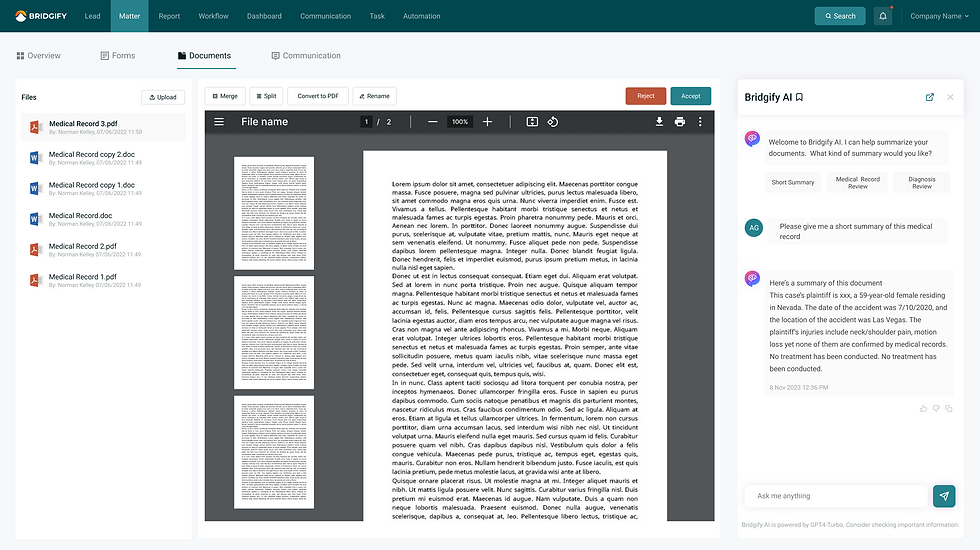
Key Functionality
Automated Summarization:
Users can click a button to generate a concise summary of extensive documents.
Interactive customization:
Users can ask follow-up questions and add or remove parameters to refine the summary.
Future Efficiency:
Users can ask follow-up questions and add or remove parameters to refine the summary.
User Impact:
This feature drastically reduces the time required for document review, enabling legal professionals to focus on higher-value tasks.
3. AI Smart analytics:
Challenge
A new tab called "smart analytics" was added alongside traditional "table" and "chart" views.
Solution
The smart analytics feature allows a user to analyze long complicated reports into bite sized information that easy to understand.

Key Functionality
Smart analytics tab
A new tab called "smart analytics" was added alongside traditional "table" and "chart" views.
Actionable insights
Users receive AI-generated insights and trends, helping them make informed decisions.
Future Efficiency
The system learns from user preferences, improving the accuracy of future summaries.
User Impact:
This feature enhances the decision-making process by providing deeper, data-driven insights.
4. AI Chat Assist:
Challenge
Efficient communication with clients is crucial for legal professionals.
Solution
We Our general AI Chat feature addresses client questions and concerns in real-time.

Real time interaction:
Users can engage with an AI chatbot to address their queries promptly.
Continuous learning:
The AI improves over time, providing more accurate and relevant responses.
Collaboration:
Multiple users can share and view the chat history.
User Impact:
This feature enhances the decision-making process by providing deeper, data-driven insights.
Collaboration & Process
Cross-Functional Teamwork:
Throughout the project, I collaborated closely with software developers, data scientists and legal experts. This collaboration ensured that out solutions were technically feasible and aligned with user needs.
Design and prototyping:
I led the design efforts, creating detailed wireframes and interactive prototypes. These prototypes were instrumental in conducting user testing and gathering valuable feedback.
User Testing and Feedback:
We conducted extensive user testing sessions with internal and external users, iterating on designs based on their feedback. This iterative process ensured that our features were intuitive, effective and met the needs of legal professionals.
The Design Elements
Design principles:
-
Clarity over density
-
Design for trust
-
Feedback at every action - Added loading states, success confirmations, error messaging
-
Added 50+ components
Specific refinements:
-
Updated spacing system for better visual rhythm
-
Created several multi-state components
-
Introduced status colour system (green = active, yellow = pending, etc.)
-
Made CTAs more prominent with increased contrast
-
Added micro-interactions (hover states, transitions) for better perceived performance

Visual Design Library


Conclusion:
The AI-powered features we developed have significantly enhanced the efficiency and effectiveness of legal professionals. By leveraging AI technology and following a user-centric design approach, we delivered innovative solutions that address key challenges in the legal industry. This project highlights my ability to lead complex design initiatives, work collaboratively with diverse teams, and deliver impactful solutions.